Your team is drowning in copies. The same to-do list lives in a Teams chat, an Outlook email, and a Word doc, and every version says something different. Microsoft Loop fixes that one problem in a way few other tools do, and if your business runs on Microsoft 365 it’s worth a
What is Microsoft Loop?
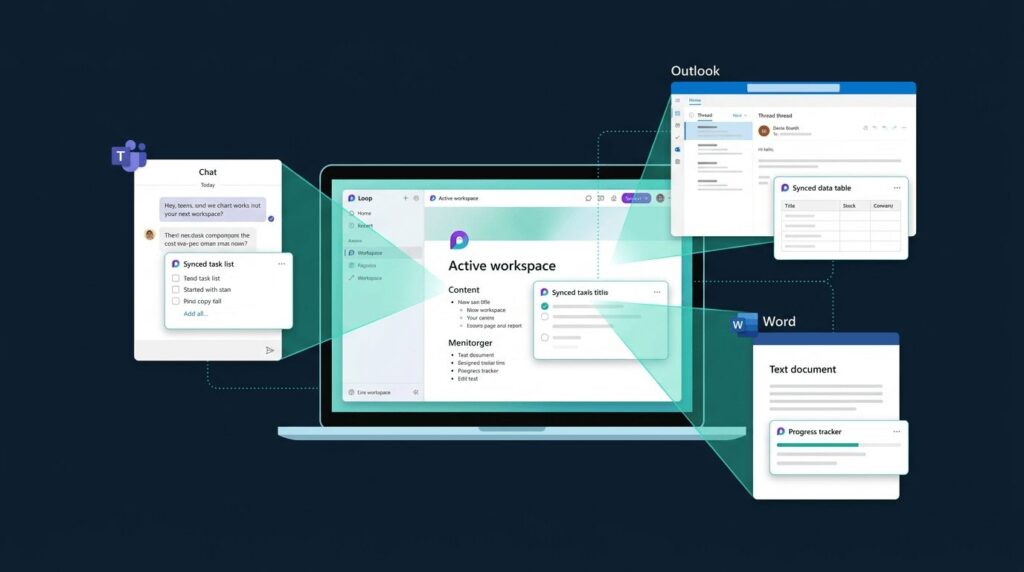
Microsoft Loop is a collaboration app built into Microsoft 365. Think of it as a shared notebook where everyone on your team can write, plan, and track work at the same time. Unlike a Word doc, the content inside Loop is live. Edit a task list in Loop and that same list updates in the Teams chat where you pasted it, in the email you sent to a client, and in the Word doc your colleague is working on. According to Microsoft, Loop is supported across Teams, Outlook, OneNote, Whiteboard, and Word for the web. The whole idea is to stop your team from chasing the latest version of anything.
The three building blocks: components, pages, workspaces
Loop has three parts, and once you understand them the rest clicks into place.
Components
These are the smallest unit. A component can be a task list, a table, a voting poll, a progress tracker, or a paragraph of text. You can paste one into a Teams chat, an Outlook email, or a Word document, and it stays in sync everywhere. Change a tick box in the email and it updates in Teams instantly.
Pages
A page is an open canvas where you bring components together. Use it for meeting notes, a project brief, or a campaign plan. Pages can hold any mix of components, text, links, and embedded files, and they grow as your project grows.
Workspaces
A workspace is a shared home for a project. Pages live inside it. Your sales team might have one workspace for client onboarding, another for quarterly planning. Anyone you invite to the workspace can see and edit every page inside.
How Loop fits with Teams, Outlook, and Word
This is where Loop earns its keep. Most teams already work in Teams chats and Outlook threads. Loop slips into those conversations rather than asking everyone to learn a new tool. In a Teams chat, click the message bar, pick Loop component, and drop in a task list. Everyone in that chat can tick items off, and the changes are visible to anyone the component is later shared with.
Sharing a status update over email used to mean copy, paste, hope for the best. With a Loop component embedded in the email, the recipient sees the current state every time they open it. If your business is still planning its move to the cloud, our practical guide to migrating to Microsoft 365 covers the foundations Loop sits on top of.
Real ways UK businesses are using Loop
Loop suits hybrid teams especially well, and that matters here. Office for National Statistics figures show 27% of workers in Great Britain were in some kind of hybrid arrangement by late 2025, with a further 13% working fully remotely. When half your team isn’t in the room, live shared notes beat email chains every time.
A few patterns we see working:
- Meeting notes that survive the meeting. One person opens a Loop page in the Teams call, the agenda is already there, and everyone types into the same notes live. Actions get assigned by name on the page itself.
- Client onboarding trackers. A Board View component shows where each new client sits, from discovery through to go-live. The account manager and the technical lead see the same view, in their own apps.
- Sales handovers. A simple table component captures deal status. Sales pastes it into the post-call email, and the project team picks it up in Teams without anyone re-typing a thing.
This kind of live coordination matters. Computer Weekly reported that 37% of UK workers say ownership of tasks in their teams is unclear, and 41% have seen projects miss objectives as a result. Loop won’t fix culture, but it does make ownership visible.
Microsoft Loop vs Notion: which one for your team?
People keep asking this one, so here’s the short version. Notion is older, has more templates, and gives you huge flexibility for personal workflows or knowledge management. Loop is younger, leaner, and built for teams already deep in Microsoft 365.
If your business runs Outlook, Teams, and Word every day, Loop wins on integration. Your data stays inside your Microsoft tenant, your security policies already cover it, and there’s no extra licence to buy if you’re on Business Standard or above. If your team is mostly in Google Workspace or works across many third-party apps, Notion’s wider integrations may suit you better.
For most UK SMEs we work with through our managed IT support service, Loop is the easier yes, because they’re already paying for it.
Licensing, security, and what your IT team needs to know
Loop is included in most business and enterprise Microsoft 365 plans, including Business Standard, Business Premium, E3, and E5. Users on lower plans like Business Basic can usually view and edit components shared with them, but can’t create workspaces of their own.
On the security side, Loop content is stored in SharePoint Embedded containers and OneDrive for Business, which means it inherits the same controls as the rest of your Microsoft 365 data. Sensitivity labels, retention policies, and Microsoft Purview all apply. Guest sharing is off by default and can be controlled centrally.
A word of caution: because components can travel between apps so easily, a careless paste into the wrong chat can expose sensitive content. Good cyber security practice and clear staff guidance matter as much as the technical controls.
How to roll out Loop without creating a mess
Loop is easy to start with, which is also its risk. Without a plan, you end up with workspaces sprawled across the business and no one sure where anything lives. A few simple ground rules help.
- Pick a pilot team. Choose one department, set them up with two or three workspaces, and learn what works before opening it up.
- Name workspaces clearly. Use a format like Department-Project-Year. Nothing kills adoption faster than a list of mystery names.
- Decide what stays in Loop and what stays in SharePoint. Loop is for live collaboration. Finished documents and records still belong in SharePoint with proper version history.
- Set sharing rules. Decide upfront whether guests are allowed and which sensitivity labels apply.
- Train people once, properly. A 30-minute walkthrough beats a year of guessing.
If you’d like a hand setting this up across your business, that’s the kind of work our team handles every week. Get in touch for a quick chat.
FAQs
Is Microsoft Loop free?
No, Loop isn’t a separate paid product, but you need a qualifying Microsoft 365 plan to create workspaces. Business Standard, Business Premium, E3, and E5 all include full Loop access. Lower plans like Business Basic can view and contribute to components shared with them, but can’t build their own workspaces.
Where is my Microsoft Loop data stored?
Loop content lives in your organisation’s Microsoft 365 tenant, in SharePoint Embedded containers and OneDrive for Business. That means it falls under the same security, retention, and compliance settings as your other Microsoft 365 data, and counts against your SharePoint storage allocation.
Can I use Microsoft Loop with people outside my company?
Yes, but it depends on your admin settings. Guest sharing of Loop workspaces and pages can be enabled, with sensitivity labels controlling which workspaces external users can access. Most businesses keep guest access off by default and turn it on case by case to reduce data leakage risk.
Does Microsoft Loop replace SharePoint, OneNote, or Teams?
No. Loop sits alongside them. SharePoint is still your document library and intranet. OneNote is still better for personal notes. Teams remains your hub for chat and meetings. Loop adds a layer of live, portable content that flows between all of them.
How is Microsoft Loop different from Microsoft Word?
Word is built for finished documents. Loop is built for live thinking. A Word doc is a single file you save and version. A Loop page is a flexible canvas where multiple components can be edited by different people, in different apps, all at once. Use Word when you need to publish. Use Loop when you need to plan.
Is Microsoft Loop safe for sensitive business data?
Yes, when set up properly. Loop inherits the security posture of Microsoft 365, including encryption, access controls, and support for Microsoft Purview governance. The main risk is human, not technical: components are easy to share by accident. Clear policies and staff training are essential alongside the platform’s built-in controls.
Microsoft Loop won’t fix every collaboration problem your business has, but for teams already living in Microsoft 365 it removes a real friction. Less chasing of versions. Fewer status update meetings. More clarity on who’s doing what. Start small, set ground rules, and let the wins do the talking.
Want Microsoft 365 managed properly for your business? See our Microsoft 365 support services.