Your website looks perfectly normal from where you’re sitting. The problem is, your visitors might not be seeing the same thing. WordPress powers more than 43% of all websites globally, and that popularity makes it a constant target. Around 13,000 WordPress sites are hacked every single day, many belonging to small and medium-sized businesses who had no idea anything was wrong.
The signs are not always obvious. Some attacks are designed to stay hidden for weeks, quietly doing damage while you carry on as normal. Knowing what to look for could save your business from serious harm to its reputation, its search rankings, and its revenue.
Your Site Is Redirecting Visitors Somewhere Else
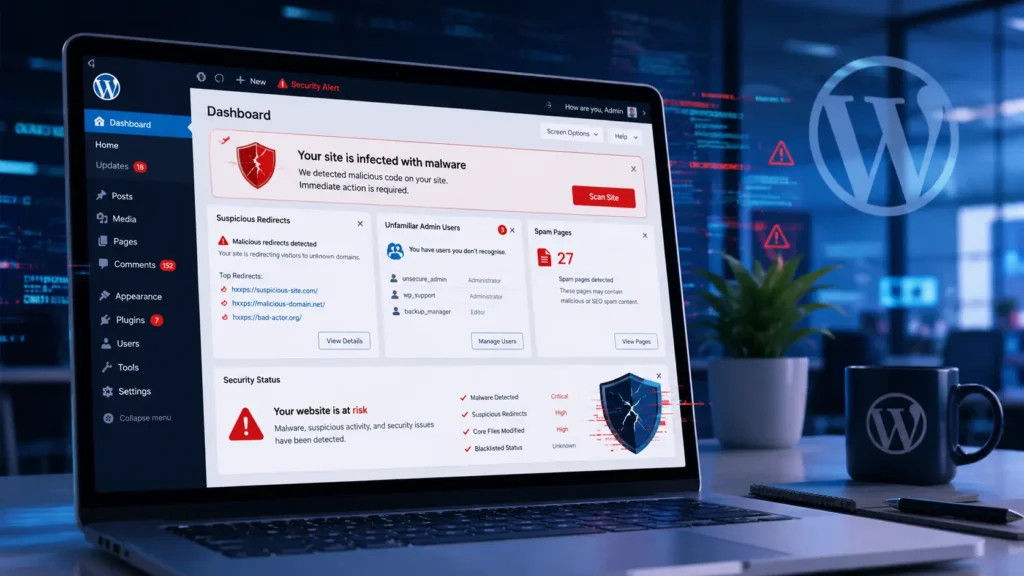
This is one of the most common attacks and one of the hardest to spot yourself. Someone visits your website and gets sent straight to a spam page, a gambling site, or something far worse. You won’t notice it on your own device because the redirect is often triggered only for new visitors, people arriving via search engines, or users on mobile.
The first sign is usually a customer complaint. Someone tells you your site “sent them somewhere weird.” Do not brush this off. Visit your site through a private browser window or ask someone outside your network to check it. If a redirect is happening, your site has almost certainly been compromised.
Google Has Flagged Your Site with a Warning
If Google’s Safe Browsing system detects malware, it places a bright red warning page in front of your site before anyone can visit. The message reads something like “Deceptive site ahead” or “This site may harm your computer.” Every major browser uses this data, so the warning shows up in Chrome, Firefox, and Safari simultaneously.
This is a business emergency. Most people will not click through a security warning. Your traffic can drop to near zero overnight, and getting the flag removed takes time even after the malware is gone, because Google needs to re-crawl and verify your site before clearing it.
You can check whether your site has been flagged at any time using Google’s Safe Browsing Transparency Report.
There Are Admin Accounts You Don’t Recognise
Log in to your WordPress dashboard and go to Users. If you see admin accounts you don’t remember creating, your site has been accessed without permission. Attackers create rogue accounts so they can return after you’ve changed your password.
These accounts often have generic names, random character strings, or email addresses that don’t belong to your business. Remove them immediately, but understand that deleting the account alone won’t fix the problem. The attacker almost certainly left other backdoors behind.
Your Site Has Slowed Down Sharply
A sudden, unexplained drop in speed is worth investigating. Some malware turns your server into a tool for sending spam emails, running cryptocurrency mining scripts, or launching attacks on other websites. All of that activity consumes your server’s resources, leaving very little left to actually serve your site to visitors.
If your site was loading quickly last week and crawling this week, run a speed test using a tool like GTmetrix or Pingdom. A sharp drop in performance with no obvious cause, no new plugins installed, no increase in traffic, is a red flag that should not be ignored.
Your Search Rankings Have Dropped Without Explanation
A hacked site can destroy years of SEO work in a matter of weeks. Attackers often inject hundreds of spam pages into your domain, targeting pharmaceutical keywords, gambling terms, or adult content. Google indexes these pages under your domain name, dragging your legitimate content down with them.
Your site may also be used to push outbound links to malicious or low-quality websites. Google penalises sites associated with spam, and recovering from that penalty takes months even after the hack is cleaned up. If your organic traffic has dropped sharply and Google Search Console is showing pages you’ve never created, treat it as a serious warning sign.
Google Search Console is free and will alert you to crawl errors, manual penalties, and unusual changes in your site’s index.
You Can’t Log In to Your WordPress Dashboard
If your usual password is suddenly not working and you haven’t changed it, someone else may have changed your credentials. Attackers sometimes lock out the legitimate site owner as part of a more aggressive takeover.
Try resetting your password via email. If the reset email doesn’t arrive, check whether your email address has been changed in the WordPress database. At that point, you’ll need to reset the admin account directly through phpMyAdmin or with the help of your hosting provider.
Suspicious Files Are Appearing in Your WordPress Directories
Most business owners don’t browse their server files regularly, and attackers know this. Malware is often hidden inside PHP files with random-looking names, buried inside your theme files or your uploads folder.
If you have FTP access or a file manager through your hosting control panel, look for .php files inside the wp-content/uploads directory. That folder is for media files and should never contain PHP scripts. Their presence almost always means a backdoor has been planted on your server.
What to Do If You Think Your Site Has Been Hacked
Act quickly, but don’t panic. Here’s what to do first.
Take your site offline if possible. This limits further damage and stops visitors being exposed to malicious content. Most hosting control panels allow you to temporarily suspend your site.
Contact your hosting provider. They may have server-level logs showing when and how the breach happened, and some managed hosts include malware scanning as part of their service.
Run a professional malware scan. Tools like Wordfence, MalCare, and Sucuri can scan your WordPress files and identify known infection patterns. For a thorough clean-up that removes all backdoors and restores your site to a safe state, professional help is far more reliable than relying on a plugin alone.
UK IT Services offers WordPress malware removal for business websites. A professional clean-up covers not just the visible infection but the hidden backdoors attackers leave behind, along with checks to reduce the risk of re-infection.
If your site handles customer data, you may also have GDPR notification obligations. A breach affecting personal data may need to be reported to the Information Commissioner’s Office within 72 hours. Check with your data protection officer if you’re unsure.
How to Prevent Your WordPress Site from Being Hacked Again
Cleaning up after a hack is always more costly than preventing one. According to Patchstack’s 2026 WordPress Security Report, 92% of successful WordPress breaches in 2025 originated from vulnerable plugins and themes, not the WordPress core itself. Keeping everything updated is the single most important thing you can do.
Beyond updates, strong passwords and two-factor authentication on all admin accounts make a real difference. Limiting login attempts, removing plugins you no longer use, and restricting who has admin access all reduce your attack surface.
Our WordPress maintenance service keeps your site updated, monitored, and backed up automatically. You get regular plugin and theme updates, uptime monitoring, daily backups, and security scanning all included. If something does go wrong, we’re on hand to fix it quickly.
For businesses that want wider protection across their whole digital setup, our cyber security services cover everything from firewall configuration to staff security awareness training.
Frequently Asked Questions
How do I know if my WordPress site has been hacked?
Look for unexpected redirects, unfamiliar admin accounts, Google security warnings, or a sudden drop in organic traffic. You can also run a free scan using a plugin like Wordfence. If you’re not sure, a professional site audit will give you a clear picture of your site’s security status.
Can a hacked WordPress site affect my Google rankings?
Yes. Attackers often inject spam pages into hacked sites, which Google indexes under your domain. Google may also flag your site entirely, removing it from search results until the malware is verified as cleared. Recovering your rankings takes time even after the site is cleaned.
How do hackers get into WordPress sites?
The vast majority of WordPress breaches come from outdated or vulnerable plugins and themes. Weak admin passwords, the absence of two-factor authentication, and shared hosting environments are also common entry points. Most attacks are carried out by automated bots scanning for known security gaps, not targeted human hackers, so no site is too small to be at risk.
Do I need to report a WordPress hack to the ICO?
If your site holds personal data and that data was exposed during the breach, you may be legally required to notify the Information Commissioner’s Office within 72 hours under UK GDPR. Speak to your IT provider or data protection officer to confirm your obligations.
How long does it take to recover a hacked WordPress site?
A simple clean-up can take a few hours. More severe infections with multiple backdoors, injected spam pages, and database modifications will take longer. Google may take several days to remove any Safe Browsing warnings after the malware has been cleared and verified.
Is ongoing WordPress maintenance worth it to prevent hacks?
Yes. The average recovery cost for a small business following a hack is far higher than the cost of ongoing protection. Regular updates, security scans, and offsite backups cost a fraction of a professional clean-up. Our WordPress care plans offer a flat monthly fee with no hidden costs.
Protect Your Business Before a Hack Happens
A hacked WordPress website doesn’t just cause technical headaches. It puts your reputation at risk, harms your search rankings, and can expose your customers’ data to serious harm. Most attacks are preventable with the right protection in place. If you’re concerned about your site’s security, or something already doesn’t look right, get in touch with UK IT Services for a free website review. We’ll tell you exactly where your site stands and what needs to be done.
Found signs of a compromise? Follow our step-by-step guide on how to recover a hacked WordPress site.